windows 11 has been kind of garbage lately. we bought a mini pc for the express purpose of streaming from our NAS to the TV, and that functionality recently broke on windows 11. yay! thus: to ubuntu we go. i’m probably going to need this later at some point, when i have long since forgotten how i did it, so:
Create a bootable USB stick (official Ubuntu desktop documentation)
i went with Ubuntu 24.04.3 LTS.
THEN. you plug your usb stick into your desired device and restart. when you can, access the boot menu. on our particular computer that key was the delete key.
Install Ubuntu Desktop (official Ubuntu desktop documentation)
this was executed flawlessly, but then i ran into a problem: the computer kept skipping the ubuntu boot and going straight to windows/other arcane nonsense i’m not computer-literate enough to know. luckily, there are people much smarter than me out there with solutions:
and, just in case the video gets deleted somehow:
- boot into ubuntu (you need to have the usb stick plugged in to do this)
- select “try ubuntu” when the installer comes up and asks if you want to try or install ubuntu
- open the terminal
- enter
sudo su - - then:
fdisk -l - this will pull up a list of all your disks. find the partition where ubuntu is. it should look like this:
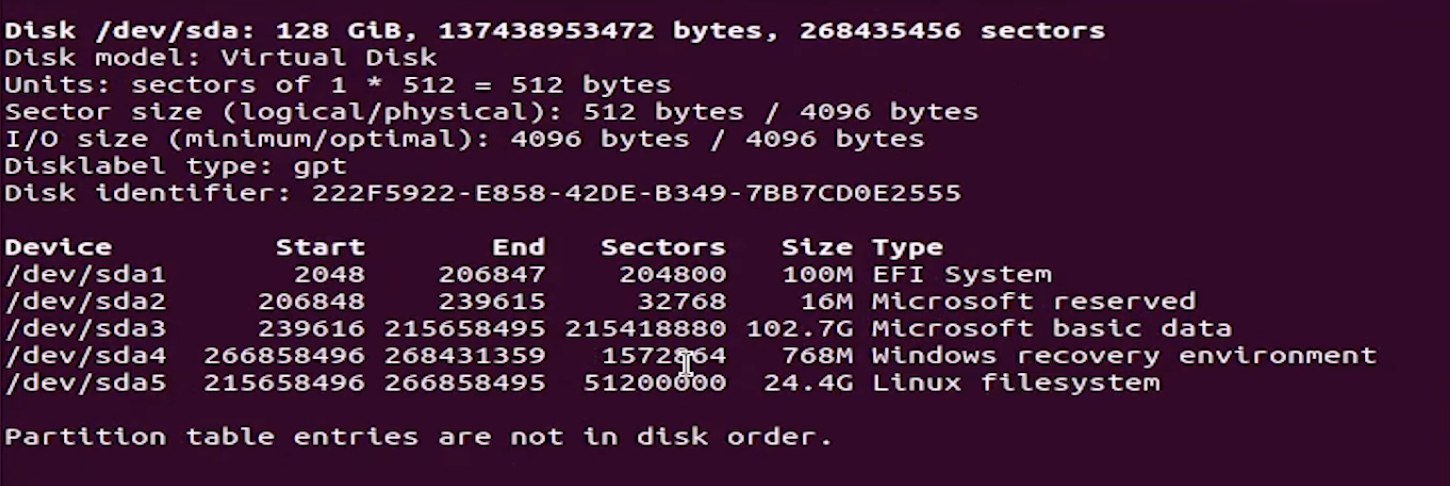
- merge the EFI System with the Linux filesystem. in the above example, those are sda1 and sda5.
mount /dev/sda5 /mnt mount /dev/sda1 /mnt/boot/efi for i in /dev /dev/pts /proc /sys /run; do mount -B $i /mnt$i; done chroot /mnt grub-install /dev/sda mount -t efivarfs none /sys/firmware/efi/efivars grub-install /dev/sda update-grub efibootmgr - after all this ubuntu should be first in the boot order
- restart computer
- ubuntu should boot now
however in my case it still didn’t boot. this was solved by hitting “delete” and going into the boot menu and prioritizing ubuntu over windows. i’ve got a beelink, so this involved going one tab over. i can’t remember what the tab name was at the moment. then grub finally loaded and i was able to boot ubuntu normally.